
Bitdefender Mobile Security
BitdefenderTools
4.727.10K Reviews
- Version
- 3.3.321.2571
- Installs
- 10.00M
- Age Rating
- Everyone
Screenshots

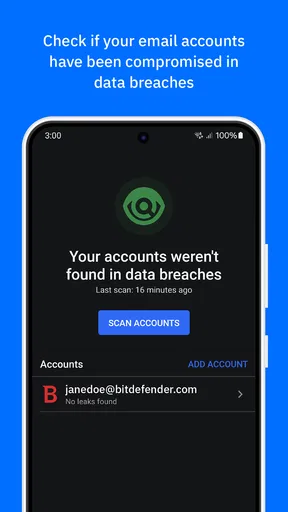
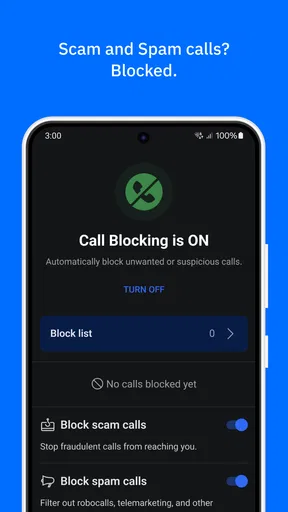
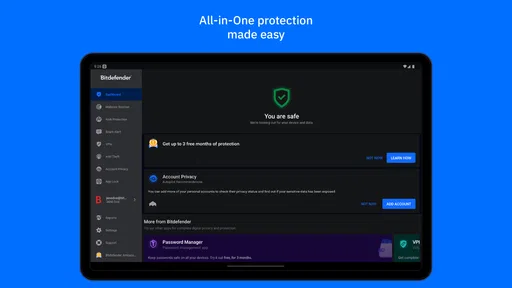
Our Review of Bitdefender Mobile Security
 Analysis by Appyee
I judge mobile security apps less by how many warnings they can display than by whether they help me make safer choices without getting in the way. Bitdefender Mobile Security has a clear appeal: it brings several kinds of protection together in a clean interface, while still asking users to make sensible decisions about setup and paid features. I see it as a useful option for people who want more than a basic malware scan, but not as a reason to stop thinking carefully about links, downloads, and account security.
What matters in everyday use
Bitdefender, a familiar name in security software, makes this free Tools app for Android and iOS. It has a 4.6 average from around 469,000 ratings, and more than 10 million installs. Those figures suggest broad adoption, but I wouldn’t use popularity alone to decide whether it suits my phone. The more useful question is whether its combination of scanning, web safeguards, and device-recovery tools matches the risks I actually face.
The practical benefit is having several security jobs gathered in one place. A scanner can help check apps and files, while web protection is aimed at risky pages encountered during browsing. Anti-theft tools address a different problem: what to do if a phone goes missing. These functions are most valuable when I set them up before I need them, rather than trying to work out how they operate during a stressful moment.
A realistic way to use it
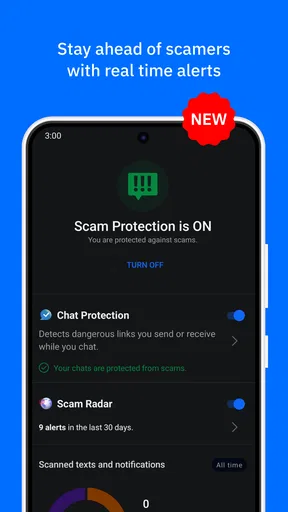
Imagine I’m on a train, checking a delivery message on my phone. The message points to a page asking me to sign in, and the address looks slightly unfamiliar. A security app may help flag a dangerous site, but I still need to pause, check the sender, and avoid entering account details just because a page looks convincing. That is the right way to think about mobile protection: a useful layer of help, not a substitute for judgment.
I’d also prepare for losing the device while I still have it. Review the anti-theft options, understand what locking or wiping means for your files, and make sure your important data is backed up through the method you normally trust. A remote wipe can protect personal information, but it is a serious last resort, not a routine troubleshooting button. The trade-off is clear: stronger recovery options are worthwhile only if you understand how you would use them.
For a cautious first run, I’d install the app from the official store, read each setup prompt, and decide deliberately which protections to enable. Then I’d check the app after setup rather than assume every feature is active automatically. This small habit is especially useful when Android or iOS requests access needed for a security function: the prompt is a chance to understand what that function does, not something to approve on autopilot.
First Impressions
Right off the bat, Bitdefender Mobile Security greets you with a sleek and straightforward interface. It’s kind of refreshing, actually. No crazy colors or overwhelming options – just a clean, intuitive layout that makes navigation a breeze. You don’t need to be a tech wizard to dive in and get things set up. Just follow the prompts, and you’re good to go.
Features That Stand Out
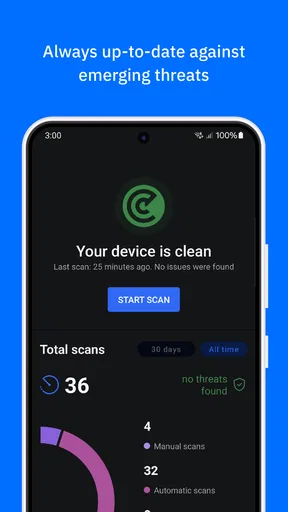
Now, let’s get into the nitty-gritty of what this app offers. First up, the malware scanner. This is the app’s bread and butter. It runs smoothly in the background, doing its thing without causing a fuss. I ran a few tests, and it caught everything I threw at it, from adware to some sketchy downloads I found lurking online. It’s quick, too, so no waiting around for hours while your phone gets scanned.
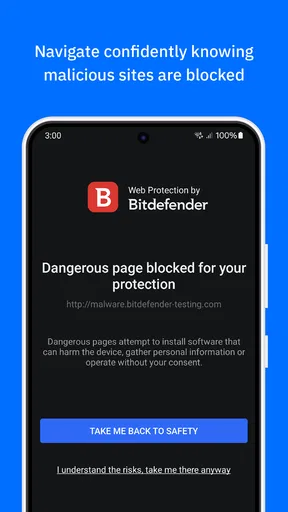
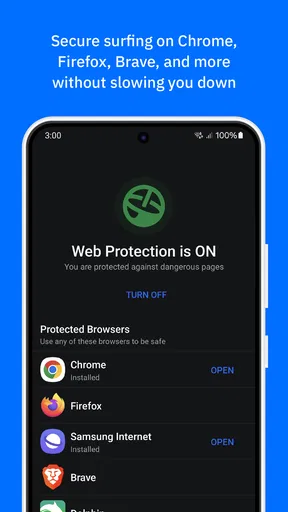
Then there’s the Web Protection. This feature is a game-changer, especially if you’re like me and enjoy surfing the web on your phone. It blocks malicious sites like a pro, so you don’t accidentally wander into dangerous territory. It’s like having a digital bodyguard while you explore the internet.
One of my favorites is the Anti-Theft feature. You can lock, locate, and even wipe your device if it gets lost or stolen. It’s a comforting thought knowing that if my phone ever makes a run for it, I have a way to track it down or protect my data.
How it compares with basic phone safeguards
Built-in protections are often enough for someone who installs only trusted apps, keeps the operating system current, and mainly needs straightforward device security. The reason I’d consider this app instead is the convenience of bringing scanning, browsing protection, and anti-theft options under one roof. That consolidation is useful if I want a single place to check my security status, but it does not make every built-in tool unnecessary.
I wouldn’t stack several security apps that all try to monitor the same activity. Overlapping tools can mean more setup, more prompts, and less clarity about which app is responsible for a warning. If I already rely on a security suite with similar protections, I’d compare what each one actually covers before adding another. For someone who only wants to check an occasional suspicious file, a lightweight scanner or the phone’s existing protections may be the simpler choice.
User Experience
Let’s talk about day-to-day use. The app runs quietly in the background, so you’re not bombarded with constant notifications. Plus, it doesn’t drain your battery, which is a huge win for those of us who are always on the go and can’t afford to be tethered to a charger.
The only thing I noticed is that the app occasionally asks for an update on its malware database. It’s a quick download, but be ready for it if you’re connected to a slower network.
Limits worth understanding
Security software can reduce exposure to known risks, but it can’t make unsafe behavior harmless. A convincing scam can arrive through a message, a social post, or an account that has been taken over; even a good web warning cannot verify every claim a person makes. I still treat unexpected requests for passwords, payment details, or one-time codes as suspicious, and I go to a service directly instead of following an unfamiliar message link.
There is also a practical cost to protection: it takes a little attention to keep the app configured and respond thoughtfully to its prompts. If you rarely browse outside trusted sites and already use the phone’s built-in security features carefully, that extra layer may feel unnecessary. And if you expect any security app to guarantee that a phone can always be found or that every threat will be stopped, this is not the right expectation to bring to it.
Compatibility and Performance
Good news! Whether you’re Team Android or Team iOS, Bitdefender Mobile Security has you covered. The app runs seamlessly on both platforms. I didn’t notice any lag or crashes, even when I had a bunch of other apps open. It’s reliable, which is exactly what you want from a security app.
The Android edition requires Android 6.0 or later, so I’d check the operating system before planning to use it on an older device. The app is rated for Everyone, which makes it broadly suitable from an age-label standpoint, though parents should still consider how their family manages downloads, browsing, and device access. Its current version is 3.3.284.2543; as with any security tool, I’d keep it updated so its components remain current.
Who will get the most from it
I’d recommend trying it if you browse frequently on your phone, install apps beyond a small set of familiar choices, or want a prepared response if your device disappears. It also makes sense for someone helping a less technical relative: a straightforward interface can make it easier to discuss basic protection, provided the person using the phone understands the prompts and knows how to reach you for help.
I’d be less inclined to recommend it to someone who wants a completely hands-off experience, dislikes granting the access a security feature may need, or already has overlapping protection they trust. iPhone owners should be especially clear about what each feature can do within iOS; the experience and available controls are shaped by the operating system, so I wouldn’t assume every tool behaves identically on Android and iOS. The best fit is someone who values a unified security app and is willing to spend a few minutes understanding its setup.
Subscription and Pricing
Now, on to the less fun stuff – pricing. You can try it for free, which is great for getting a feel of what it’s all about. But to unlock all its features, you’ll need to subscribe. It’s reasonably priced, considering the peace of mind it offers. Plus, there are often deals and discounts if you keep an eye out.
The app is free to download, with in-app purchases ranging from $0.99 to $159.99 per item. I’d check the purchase screen carefully and decide which protections I actually need before paying; the presence of optional purchases means the free download should not be mistaken for every feature being free. It was released on May 12, 2011, and has accumulated around 26,000 written reviews alongside its ratings, but neither longevity nor review volume replaces checking that the current offering fits your needs.
My verdict
So, is Bitdefender Mobile Security worth it? Absolutely, if you’re looking for a comprehensive, easy-to-use security app that doesn’t hog your phone’s resources. It’s packed with features that actually work and is a solid defense against the digital threats lurking out there.
If you value your privacy and want to keep your device secure without any hassle, give this app a shot. It might just be the shield your phone needs.
My recommendation is to start with the free download, configure only the protections you understand, and then decide whether the paid options add enough value for your routine. If you want scanning, safer browsing, and a plan for a misplaced phone in one app, it’s a credible choice from Bitdefender. If your needs are narrower, your phone’s built-in safeguards may be enough. Either way, good habits—careful link checks, sensible downloads, and a backup you can rely on—remain part of the protection.
Verdict
Strengths of Bitdefender Mobile Security
- Intuitive and user-friendly interface.
- Low impact on device performance.
- Comprehensive anti-theft features.
- Real-time malware detection.
- Web protection for safe browsing.
Limitations of Bitdefender Mobile Security
- Premium features require payment.
- Occasional false-positive alerts.
- Limited free version features.
- VPN has daily data limits.
- Some features need manual setup.
Other Releases by Bitdefender
View All
Bitdefender VPN: Fast & Secure
Tools4.7
Similar Picks in This Category
View All
Google LLC4.0

Gboard - the Google Keyboard
Google LLC4.5

Google Play services
Google LLC4.3

Google Play Store
Google LLC4.9

Files by Google
Google LLC4.5

SHAREit: Transfer, Share Files
Smart Media4U Technology Pte.Ltd.4.3
Frequently Asked Questions
What features does Bitdefender Mobile Security offer?
Bitdefender Mobile Security provides a range of features designed to protect your device. These include malware protection, web security, anti-theft tools, and privacy protection. Additionally, it offers a VPN for secure browsing, app lock to protect sensitive apps, and account privacy checker to ensure your credentials haven't been compromised.
Is Bitdefender Mobile Security compatible with both Android and iOS?
Yes, Bitdefender Mobile Security is available for both Android and iOS devices. However, the features might slightly vary between the two platforms due to different system capabilities. It's designed to optimize device performance while providing comprehensive security on both types of operating systems.
How does Bitdefender Mobile Security affect device performance?
Bitdefender Mobile Security is designed to be lightweight and efficient, ensuring it doesn't significantly affect your device's performance. It runs in the background with minimal impact on battery life and system resources, allowing you to use your device smoothly while maintaining strong protection.
Does Bitdefender Mobile Security require a subscription?
Yes, Bitdefender Mobile Security typically requires a subscription to access its full suite of features. While there may be a trial period or limited free version available, subscribing will unlock advanced features such as the VPN, app lock, and anti-theft tools. Pricing can vary based on the plan you choose.
How effective is Bitdefender Mobile Security against malware?
Bitdefender Mobile Security is highly effective against malware, consistently receiving top ratings from independent security testing organizations. Its real-time detection capabilities help identify and neutralize threats before they can cause harm, offering robust protection against viruses, phishing attempts, and other malicious activities.
